
OpenFigura:AI Agent 工具实践指南
2026-10-06 3467497

2026-10-05 0
智能体若只能保留当前线程中的消息,就难以在多次会话之间延续用户偏好和历史信息。要让应用具备可持续积累的记忆能力,需要把数据组织、持久化存储与检索机制结合起来。下面从 LangChain 与 LangGraph Store 入手,分析长期记忆的结构,并演示内存和 PostgreSQL 两种实现。
长期记忆(Long-term memory)能够让智能体(agent)在不同对话、会话之间存储和调取信息
短期记忆(Short-term memory)仅作用于单一线程;与之不同,长期记忆可跨线程持久保存,并且随时可以读取。
长期记忆基于 LangGraph 的存储模块实现,该模块将数据保存为 JSON 文档,通过命名空间(namespace)和键(key)做数据组织。
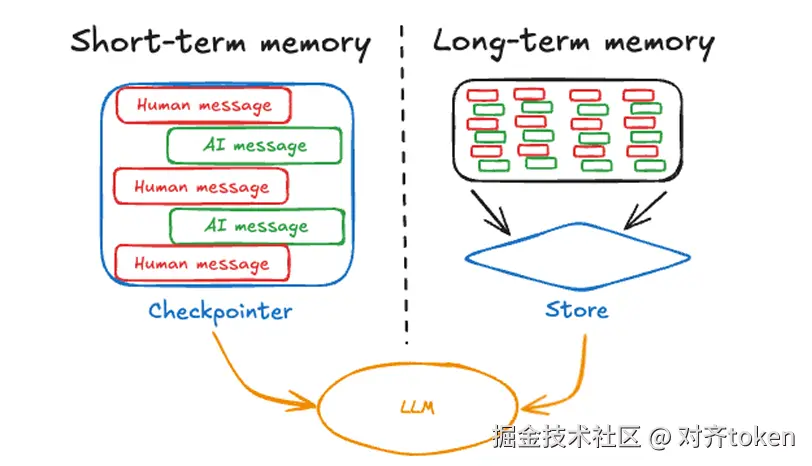
Tips:不管是长期记忆还是短期记忆,都有内存和持久化两种方式
from langchain.agents import create_agent
from langchain_core.runnables import Runnable
from langgraph.store.memory import InMemoryStore

# `InMemoryStore` 将数据保存在内存字典中。生产环境请使用基于数据库的存储。
store = InMemoryStore()

agent: Runnable = create_agent(
    "claude-sonnet-4-6",
    tools=[],
    store=store,
)
# pip install -U langgraph-checkpoint-postgres "psycopg[binary]"
from langchain.agents import create_agent
from langchain_core.runnables import Runnable
from langgraph.store.postgres import PostgresStore  # type: ignore[import-not-found]

DB_URI = "postgresql://postgres:postgres@localhost:5432/postgres?sslmode=disable"

with PostgresStore.from_conn_string(DB_URI) as store:

    store.setup()
    agent: Runnable = create_agent(
        "claude-sonnet-4-6",
        tools=[],
        store=store,
    )
LangGraph 将长期记忆以 JSON 文档的形式存储在存储层(stores)中:
namespace + key 组合定位一条记忆:namespace 做分组隔离,key 在分组内唯一["memories", "user_123"],代表用户 123 的记忆文件夹filter 做结构化精确匹配,不进行向量相似度排序,返回顺序由存储实现决定。filter,先过滤再排序。def embed(texts: Sequence[str]) -> list[list[float]]:
# 假定返回一个向量
return [[1.0, 2.0] for _ in texts]
# InMemoryStore saves data to an in-memory dictionary. Use a DB-backed store in production use.
store = InMemoryStore(index=IndexConfig(embed=embed, dims=2))
user_id = "my-user"
application_context = "chitchat"
namespace = (user_id, application_context)
store.put(
namespace,
"a-memory",
{
"rules": [
"User likes short, direct language",
"User only speaks English & python",
],
"area": "北美",
},
)
store.put(
namespace,
"b-memory",
{
"rules": [
"我喜欢国语",
"我只会说一顶点点英文",
],
"area": "炎黄子孙",
},
)
# 通过ID获取存储数据
item = store.get(namespace, "a-memory")
rprint(item)
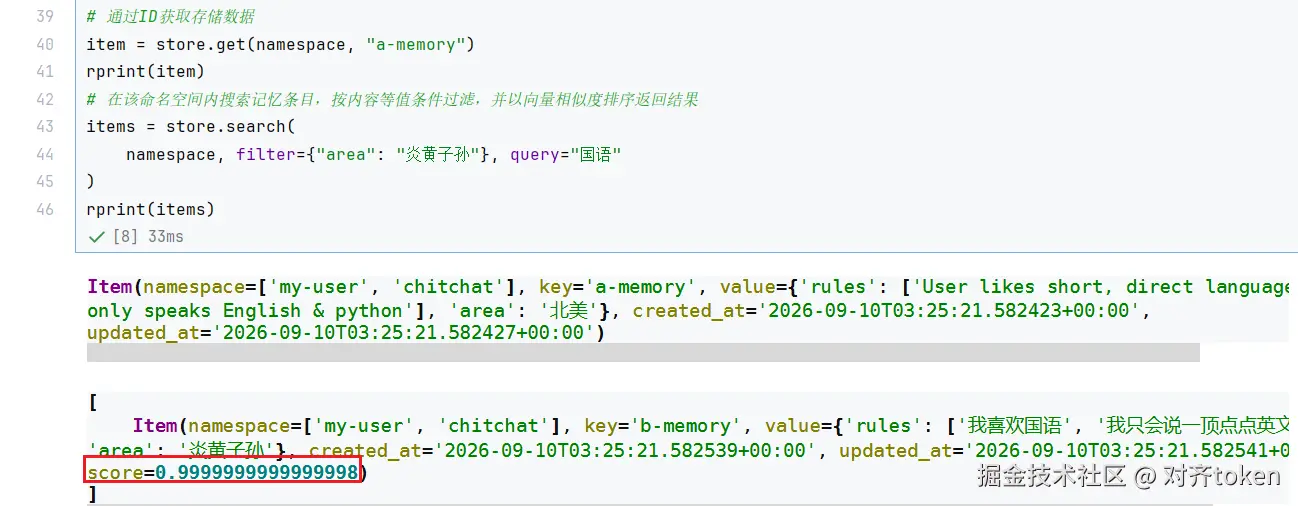
# 在该命名空间内搜索记忆条目,按内容等值条件过滤,并以向量相似度排序返回结果
items = store.search(
namespace, filter={"area": "炎黄子孙"}, query="国语"
)
rprint(items)
DB_URI = "postgresql://postgres:postgres@localhost:5432/postgres?sslmode=disable"

with PostgresStore.from_conn_string(DB_URI) as store:
    store.setup()
其中setup() 函数会创建所需要的表: store,store_migrations,vector_migrations
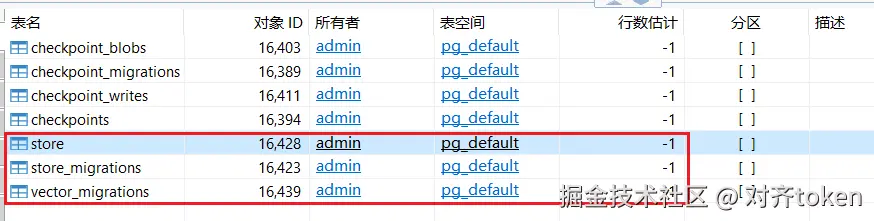
store:存业务 / 记忆 KV 数据store_migrations:跟踪 store 表结构版本vector_migrations:跟踪向量索引 / 向量表的版本(需要 pgvector)store 【核心业务数据主表】作用:保存普通键值数据(非向量),对应 store.put() / store.get() 读写的内容(Agent 记忆、用户配置、会话元数据等)。
关键字段:
prefix:命名空间(类似文件夹,用来分组数据,比如 ("users","123"))key:记录的键value:JSONB 存储的值created_at / updated_at:创建更新时间expires_at:TTL 过期时间(可选自动清理)简单理解:LangGraph 内置 KV 存储,Agent 的长期记忆就存在这张表里。
store_migrations 【KV 表的迁移版本记录表(框架内部)】作用:记录 store 表的 schema 迁移版本,属于框架内部管理表,业务代码不要手动读写。
逻辑:
setup(),会先读这张表,判断当前数据库的表结构版本store表结构,不会破坏已有数据类似 Alembic/ Flyway 版本控制,只管
store这一套 KV 结构。
vector_migrations 【向量索引迁移版本记录表(框架内部)】作用:管理向量索引的迁移版本,依赖 pgvector 扩展。
注意:真正的向量 embedding 数据存在
store_vectors表(不是 vector_migrations),vector_migrations只是版本追踪表。
index_config(启用向量检索)才会用到这套逻辑setup() 会检查这个表,自动创建 / 升级向量表、向量索引通过ToolRuntime获取store信息
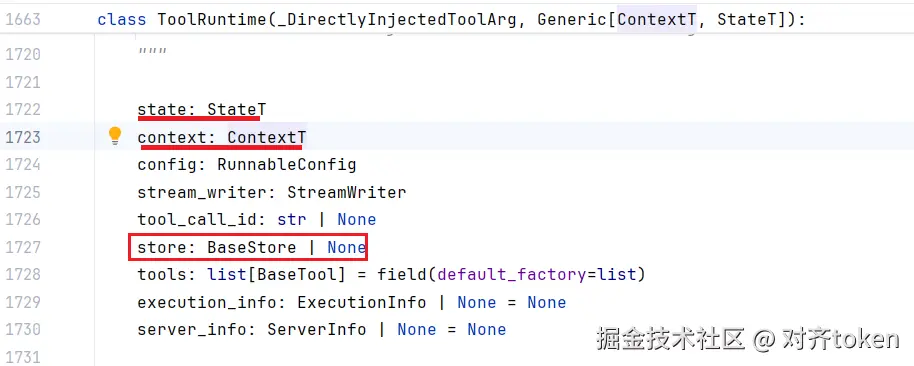
Tips:从源码中可以看到,
ToolRuntime不仅可以获取store,还能获取state和context上下文
ToolRuntime定义如下:
案例代码:
@dataclass
class Context:
    user_id: str


with PostgresStore.from_conn_string(DB_URI) as store:
    store.setup()
    store.put(("users",), "user_123", {"name": "John Smith", "language": "English"})


    @tool
    def get_user_info(runtime: ToolRuntime[Context]) -> str:
       """Look up user info."""
       assert runtime.store is not None
       # 根据用户id获取用户信息
       user_info = runtime.store.get(("users",), runtime.context.user_id)

       return str(user_info.value) if user_info else "Unknown user"


    agent = create_agent(
       model = model,
       tools = [get_user_info],
       store = store,
       context_schema = Context,
    )

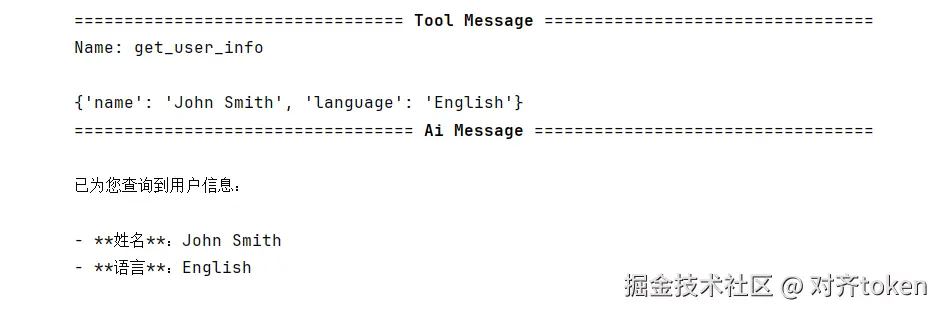
    result = agent.invoke(
       {"messages": [{"role": "user", "content": "查看用户信息"}]},
       context = Context(user_id = "user_123"),
    )
    for m in result["messages"]:
       m.pretty_print()
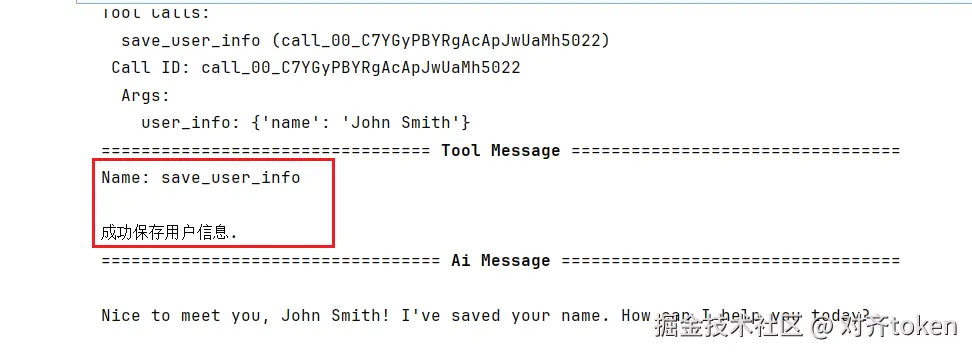
使用put保存信息
@tool
def save_user_info(user_info: UserInfo, runtime: ToolRuntime[Context]) -> str:
    """保存用户信息."""
    assert runtime.store is not None
    runtime.store.put(("users",), runtime.context.user_id, dict(user_info))
    return "成功保存用户信息."

with PostgresStore.from_conn_string(DB_URI) as store:
    store.setup()
    agent: Runnable = create_agent(
        model=model,
        tools=[save_user_info],
        store=store,
        context_schema=Context
    )

    result= agent.invoke(
        {"messages": [{"role": "user", "content": "My name is John Smith"}]},
        context=Context(user_id="user_123"),
    )
    for m in result["messages"]:
        m.pretty_print()
store 表中可以看到存储的结果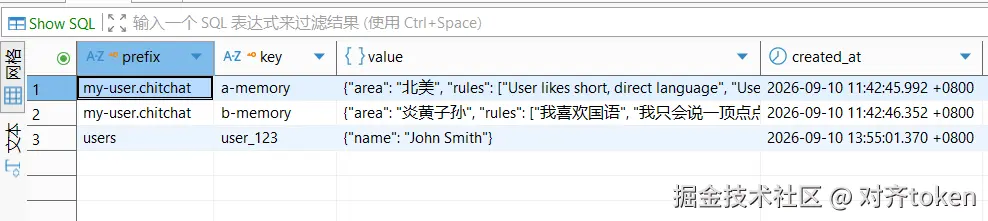
namespace + key 定位。InMemoryStore(内存字典),生产用 PostgresStore(需 pgvector 支持向量检索)。ToolRuntime 拿到 store 实例,用 get 读取、put 写入,实现 Agent 的“经验沉淀”。没有长期记忆的 Agent 只是个金鱼脑,有了 Store,它才算真正有了“积累”。
~如果觉得有用,别忘了点赞、在看、转发三连支持!