

Elasticsearch 长工单分类怎么做?用 Percolator 对照整篇与分段
2026-11-26 3471917

2026-11-27 0
如果手上只有一个状态值,就用 term 做精确查询。有多个可接受的状态时,改用 terms,其中任意一个候选匹配即可。状态、编号和完整商品名通常查 keyword 字段或子字段。正文检索可用 match。排查结果时先检查字段的映射与索引词项。
下面在 Kibana Dev Tools 的 Console 中执行。用一个尚未创建的实验索引,显式声明 status 为 keyword,让商品名 name 同时支持全文检索与 name.exact 整值匹配。本文在 Elasticsearch 8.19.0 上验证了这些请求。
PUT term-match-demo
{
  "mappings": {
    "properties": {
      "status": {
        "type": "keyword"
      },
      "name": {
        "type": "text",
        "fields": {
          "exact": {
            "type": "keyword"
          }
        }
      }
    }
  }
}
批量写入四条记录,其中 p4 的状态字段是数组。末行保留换行,refresh=wait_for 会等到写入可被搜索后再返回。确认批量响应里的 errors 为 false。
POST term-match-demo/_bulk?refresh=wait_for
{"index":{"_id":"p1"}}
{"status":"ACTIVE","name":"Trail Mug"}
{"index":{"_id":"p2"}}
{"status":"BACKORDER","name":"Trail Mug Lid"}
{"index":{"_id":"p3"}}
{"status":"active","name":"Camp Bowl"}
{"index":{"_id":"p4"}}
{"status":["ARCHIVED","BACKORDER"],"name":"Camp Spoon"}
先给查询传一个大写的 ACTIVE。示例采用对象写法,value 放具体状态值。
GET term-match-demo/_search?filter_path=hits.hits._id
{
  "query": {
    "term": {
      "status": {
        "value": "ACTIVE"
      }
    }
  }
}
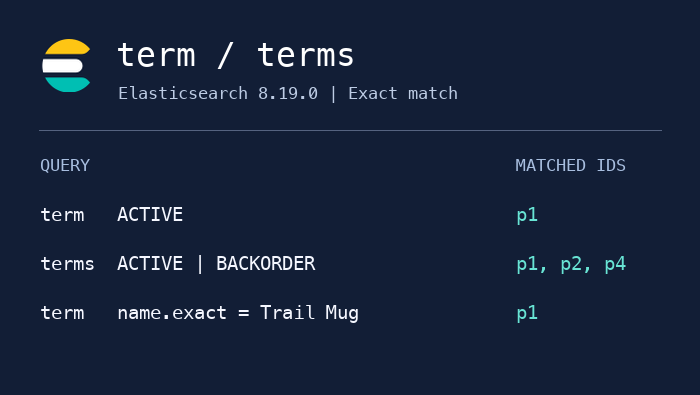
实测只命中 p1。没有配置规范化器的 keyword 字段默认区分大小写,因此值为小写 active 的 p3 未命中。
把 ACTIVE 和 BACKORDER 放入同一个数组。terms 对这些候选值执行任一匹配。
GET term-match-demo/_search?filter_path=hits.hits._id
{
  "query": {
    "terms": {
      "status": [
        "ACTIVE",
        "BACKORDER"
      ]
    }
  }
}
实测命中 p1、p2、p4。p4 的数组有一个元素等于 BACKORDER,所以同样入选。示例中的 ID 按字母顺序整理,搜索响应没有指定排序。若业务要求至少命中指定个数的候选值,可用 terms_set。terms 的候选数默认最多 65,536 个,由 index.max_terms_count 控制。
同样是 Trail Mug,对 name 执行下面的 term 得到零条结果。默认标准分析器把这段文本索引成 trail 和 mug。下方分析请求可以查看词项。
GET term-match-demo/_search?filter_path=hits.hits._id
{
  "query": {
    "term": {
      "name": "Trail Mug"
    }
  }
}
POST term-match-demo/_analyze
{
"field": "name",
"text": "Trail Mug"
}把同一个查询值交给 name.exact,实测只命中 p1。p2 的整值是 Trail Mug Lid,同样的开头并不会命中。.exact 是本例自定义的名字。已有索引使用什么后缀,以 GET term-match-demo/_mapping 一类的映射查询结果为准。给已有字段补加多字段后,需要更新或重新索引旧文档,才能给旧记录填充新子字段。
GET term-match-demo/_search?filter_path=hits.hits._id
{
  "query": {
    "term": {
      "name.exact": "Trail Mug"
    }
  }
}对于单值查询,Elasticsearch 7.10 起的 term 支持 case_insensitive。下面的请求实测命中 p1 和 p3。这个选项用于 ASCII 大小写匹配,terms 未提供同名选项。若候选列表也要按大小写统一处理,可为 keyword 字段配置合适的 normalizer,并对现有数据重建索引以应用新映射。
GET term-match-demo/_search?filter_path=hits.hits._id
{
  "query": {
    "term": {
      "status": {
        "value": "active",
        "case_insensitive": true
      }
    }
  }
}term。terms。keyword 字段。match。