

Elasticsearch 长工单分类怎么做?用 Percolator 对照整篇与分段
2026-11-26 3471917

2026-11-27 0
在订单详情需要逐行展示商品和数量时,可在 lines 的映射上使用 synthetic_source_keep: all。扫码号若只需要按输入顺序返回并留下重复值,则为 scan_ids 单独配置 arrays。
以下请求可依次粘贴到 Kibana Dev Tools 的 Console。实验使用 Elasticsearch 8.19.0 和试用许可证,从三个独立的新索引开始。每组写入同一份订单,订单行按 B、A、B 排列,扫码号按 20、10、20 排列。要重新跑一组,可先将该组请求中的索引名统一改成一个新名字。
先创建一个启用了 synthetic _source 的普通索引,不配置任何保留选项。读回时会按映射重建字段,适用于读取端可以接受重建形式的情况。
PUT b32-44-orders-default
{
  "settings": {
    "index.mapping.source.mode": "synthetic"
  },
  "mappings": {
    "properties": {
      "lines": {
        "type": "object",
        "properties": {
          "sku": {
            "type": "keyword"
          },
          "qty": {
            "type": "integer"
          }
        }
      },
      "scan_ids": {
        "type": "integer"
      }
    }
  }
}

PUT b32-44-orders-default/_doc/1
{
  "lines": [
    {
      "sku": "B",
      "qty": 2
    },
    {
      "sku": "A",
      "qty": 1
    },
    {
      "sku": "B",
      "qty": 2
    }
  ],
  "scan_ids": [
    20,
    10,
    20
  ]
}

GET b32-44-orders-default/_source/1
在 Elasticsearch 8.19.0 中读回的结果如下。
{
  "lines": {
    "qty": [
      1,
      2,
      2
    ],
    "sku": [
      "A",
      "B"
    ]
  },
  "scan_ids": [
    10,
    20,
    20
  ]
}
此时 lines 成了包含两个字段数组的对象,前端已无法从该结果还原三条订单行。这里的整数数组被排序但仍有两个 20,keyword 类型的 SKU 则按此映射的重建行为排序并去重。
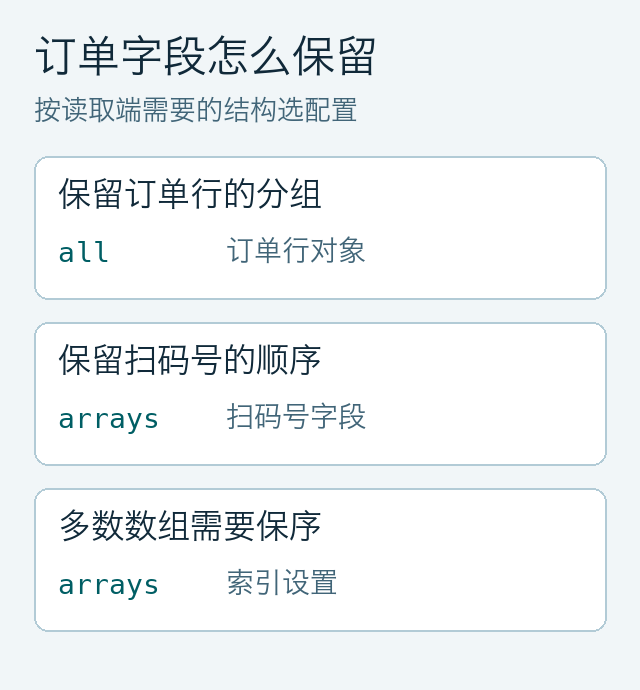
订单回显需要保留每行的字段组合,因此把 all 放在 lines 对象上。该选项会记录对象及其子字段和子对象,也覆盖同一字段收到单个对象的情况。scan_ids 的一维整数值只需保序并保留重复项,字段级 arrays 足够。额外存储主要集中在这些选中的字段。
PUT b32-44-orders-selective
{
  "settings": {
    "index.mapping.source.mode": "synthetic"
  },
  "mappings": {
    "properties": {
      "lines": {
        "type": "object",
        "properties": {
          "sku": {
            "type": "keyword"
          },
          "qty": {
            "type": "integer"
          }
        },
        "synthetic_source_keep": "all"
      },
      "scan_ids": {
        "type": "integer",
        "synthetic_source_keep": "arrays"
      }
    }
  }
}

PUT b32-44-orders-selective/_doc/1
{
  "lines": [
    {
      "sku": "B",
      "qty": 2
    },
    {
      "sku": "A",
      "qty": 1
    },
    {
      "sku": "B",
      "qty": 2
    }
  ],
  "scan_ids": [
    20,
    10,
    20
  ]
}

GET b32-44-orders-selective/_source/1
在 Elasticsearch 8.19.0 中读回的结果如下。
{
  "lines": [
    {
      "sku": "B",
      "qty": 2
    },
    {
      "sku": "A",
      "qty": 1
    },
    {
      "sku": "B",
      "qty": 2
    }
  ],
  "scan_ids": [
    20,
    10,
    20
  ]
}
三个订单行按 B、A、B 返回,每个 sku 与本行的 qty 仍在同一个对象内。重复的 B 行和重复的扫码号都在。
如果索引里有大量类似扫码号的数组,可以在建索引时统一设置 index.mapping.synthetic_source_keep: arrays,把 all 留给要求原样返回的订单行。需要保存的数组越多、越大,额外占用就越多。
PUT b32-44-orders-indexwide
{
  "settings": {
    "index.mapping.source.mode": "synthetic",
    "index.mapping.synthetic_source_keep": "arrays"
  },
  "mappings": {
    "properties": {
      "lines": {
        "type": "object",
        "properties": {
          "sku": {
            "type": "keyword"
          },
          "qty": {
            "type": "integer"
          }
        },
        "synthetic_source_keep": "all"
      },
      "scan_ids": {
        "type": "integer"
      }
    }
  }
}

PUT b32-44-orders-indexwide/_doc/1
{
  "lines": [
    {
      "sku": "B",
      "qty": 2
    },
    {
      "sku": "A",
      "qty": 1
    },
    {
      "sku": "B",
      "qty": 2
    }
  ],
  "scan_ids": [
    20,
    10,
    20
  ]
}

GET b32-44-orders-indexwide/_source/1
在 Elasticsearch 8.19.0 中读回的结果如下。
{
  "lines": [
    {
      "sku": "B",
      "qty": 2
    },
    {
      "sku": "A",
      "qty": 1
    },
    {
      "sku": "B",
      "qty": 2
    }
  ],
  "scan_ids": [
    20,
    10,
    20
  ]
}
索引级参数支持 none 和 arrays。需要单独回到默认重建规则的字段可显式配置 synthetic_source_keep: none。
arrays 对多层数组只承诺元素顺序与重复值,嵌套形状可能变化。涉及 ignore_above 或 ignore_malformed 的被忽略元素还可能出现在末尾。依赖原结构时,在对应字段或对象上选 all 并用实际样本验证。
这些保留片段在写入时记录。迁移时先建好新索引,再从原始数据或仍保有完整结构的来源重新写入。旧索引读出的 synthetic _source 若已丢失行分组,直接从它重建索引只能拿到重建后的字段值。
all。arrays。arrays,再单独处理必须保留完整结构的对象。index.mapping.source.mode: stored。加了 all,能按同一行的 SKU 和数量联合查询吗? all 作用于 _source 的读回。若查询也要求把两个条件限定在同一个订单行,应另外评估 nested 映射及其查询写法。