

Elasticsearch 长工单分类怎么做?用 Percolator 对照整篇与分段
2026-11-26 3471917

2026-11-26 0
附近门店列表出错时,先对照搜索目标和字段映射。 本例的地理字段为 store.location,类型为 geo_point。以下请求在 Elasticsearch 9.2.0 的合成门店数据上实测。
在 Kibana 的 Dev Tools → Console 中按顺序执行下面的请求。shops-current 有三个门店,其中一个缺坐标;shops-legacy 代表还没有地理字段的历史索引。别名 shops-read 同时指向两个索引。请使用测试环境和未占用的示例名称。
PUT /shops-current
{
  "mappings": {
    "properties": {
      "store": {
        "properties": {
          "location": {
            "type": "geo_point"
          }
        }
      }
    }
  }
}

PUT /shops-legacy
{
  "mappings": {
    "properties": {
      "name": {
        "type": "keyword"
      }
    }
  }
}

PUT /shops-current/_doc/near?refresh=true
{
  "store": {
    "location": {
      "lat": 31.2304,
      "lon": 121.4737
    }
  }
}

PUT /shops-current/_doc/far?refresh=true
{
  "store": {
    "location": {
      "lat": 31.3,
      "lon": 121.4737
    }
  }
}

PUT /shops-current/_doc/no-coordinates?refresh=true
{
  "name": "待补坐标"
}

PUT /shops-legacy/_doc/old?refresh=true
{
  "name": "旧门店"
}

POST /_aliases
{
  "actions": [
    {
      "add": {
        "index": "shops-current",
        "alias": "shops-read"
      }
    },
    {
      "add": {
        "index": "shops-legacy",
        "alias": "shops-read"
      }
    }
  ]
}
先把字段误写成 location。即使目标索引已为 store.location 配好了映射,查询仍会返回 HTTP 400,根因为 failed to find geo field [location]。
GET /shops-current/_search?allow_partial_search_results=false
{
  "query": {
    "geo_distance": {
      "distance": "2km",
      "location": {
        "lat": 31.2304,
        "lon": 121.4737
      }
    }
  }
}对 shops-read 请求 _field_caps,启用 include_unmapped=true 后可查出别名覆盖范围内缺映射的索引。随后读取具体索引的字段定义,核实请求使用的名称与映射一致。
GET /shops-read/_field_caps?fields=store.location&include_unmapped=true

GET /shops-current/_mapping/field/store.location
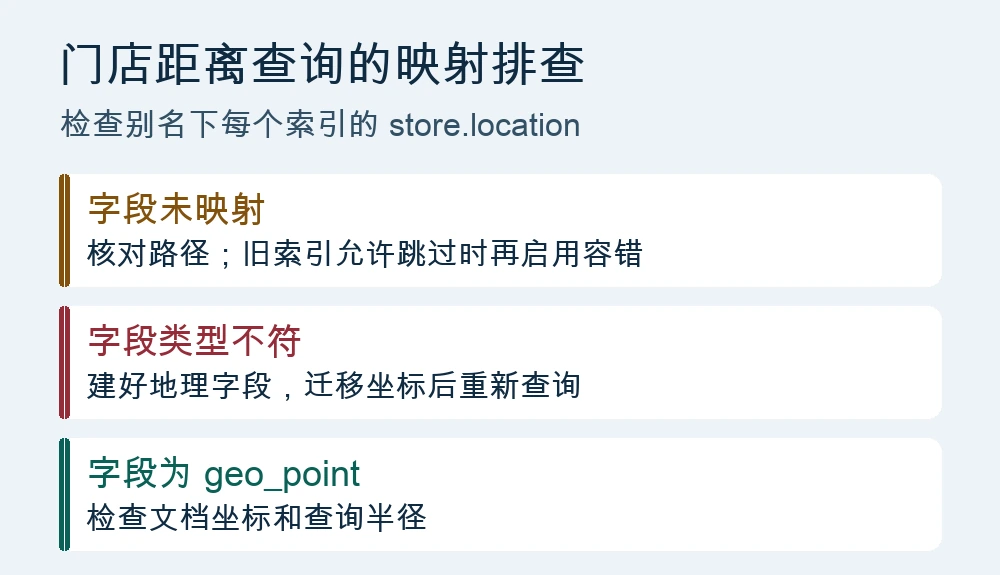
实测 fields.store.location 下有两个类型条目。geo_point.indices 列出 shops-current,unmapped.indices 列出 shops-legacy。如果返回了多个已映射类型,也要逐个检查各条目里的索引清单。
| 实测条件 | 处理方式 | 结果与限制 |
|---|---|---|
| 字段只写了 location | 改用 store.location | 搜索新索引时命中 near |
| 旧索引完全缺映射 | 允许跳过时使用 ignore_unmapped | 历史索引的文档均不匹配这条距离条件 |
| 坐标被映射为普通对象或 keyword | 建正确映射并迁移 | 容错可能返回零命中或报类型错误 |
只查已有坐标的新索引时,修正路径即可。下面的查询命中 near 一条,距离超过两公里的 far 和没有坐标的 no-coordinates 都没有命中。
GET /shops-current/_search?allow_partial_search_results=false
{
  "query": {
    "geo_distance": {
      "distance": "2km",
      "store.location": {
        "lat": 31.2304,
        "lon": 121.4737
      }
    }
  }
}
如果业务接受附近门店列表暂时省略缺坐标的旧数据,可以给别名查询加上 ignore_unmapped: true。同一别名不加这个选项时,在示例明确关闭部分结果的条件下返回 HTTP 400;加上后只命中 near。
GET /shops-read/_search?allow_partial_search_results=false
{
  "query": {
    "geo_distance": {
      "distance": "2km",
      "store.location": {
        "lat": 31.2304,
        "lon": 121.4737
      }
    }
  }
}

GET /shops-read/_search?allow_partial_search_results=false
{
  "query": {
    "geo_distance": {
      "distance": "2km",
      "store.location": {
        "lat": 31.2304,
        "lon": 121.4737
      },
      "ignore_unmapped": true
    }
  }
}
动态映射可能把坐标存成两个数值子字段。已有普通对象无法就地改为 geo_point,需要预建正确映射的新索引,再迁移旧数据。切换别名前检查失败记录、数量和抽样查询。索引模板也要同步更新,保持后续滚动索引使用相同映射。
下面模拟已有普通对象映射的索引,验证容错的边界。在 9.2.0 中,普通对象路径未被视为可查询字段,打开 ignore_unmapped 后得到零命中;若同一路径显式映射为 keyword,打开容错仍返回 HTTP 400。
PUT /shops-wrong/_doc/old?refresh=true
{
  "store": {
    "location": {
      "lat": 31.2304,
      "lon": 121.4737
    }
  }
}

GET /shops-wrong/_search?allow_partial_search_results=false
{
  "query": {
    "geo_distance": {
      "distance": "2km",
      "store.location": {
        "lat": 31.2304,
        "lon": 121.4737
      },
      "ignore_unmapped": true
    }
  }
}

PUT /shops-keyword
{
  "mappings": {
    "properties": {
      "store": {
        "properties": {
          "location": {
            "type": "keyword"
          }
        }
      }
    }
  }
}

PUT /shops-keyword/_doc/old?refresh=true
{
  "store": {
    "location": "31.2304,121.4737"
  }
}

GET /shops-keyword/_search?allow_partial_search_results=false
{
  "query": {
    "geo_distance": {
      "distance": "2km",
      "store.location": {
        "lat": 31.2304,
        "lon": 121.4737
      },
      "ignore_unmapped": true
    }
  }
}
对普通对象案例,源里的 {lat, lon} 可直接写入新索引的 geo_point 字段。下列迁移创建一条文档,距离复查命中 old。字符串或其他坐标格式需先核对输入。
PUT /shops-repaired
{
  "mappings": {
    "properties": {
      "store": {
        "properties": {
          "location": {
            "type": "geo_point"
          }
        }
      }
    }
  }
}

POST /_reindex?refresh=true
{
  "source": {
    "index": "shops-wrong"
  },
  "dest": {
    "index": "shops-repaired"
  }
}

GET /shops-repaired/_search?allow_partial_search_results=false
{
  "query": {
    "geo_distance": {
      "distance": "2km",
      "store.location": {
        "lat": 31.2304,
        "lon": 121.4737
      }
    }
  }
}
geo_point,区域等几何数据可按需求采用 geo_shape。索引有映射,只是有些门店没有坐标,会报字段不存在吗? 该索引上的地理字段能正常解析,缺坐标的门店不会命中距离查询。用映射区分索引级问题和文档级缺值。
修好映射后为什么仍然没有结果? 核对目标是否为预期索引、写入是否已经刷新,以及查询半径和坐标顺序。对象形式用具名 lat、lon,数组形式用 [lon, lat]。