

Elasticsearch 长工单分类怎么做?用 Percolator 对照整篇与分段
2026-11-26 3471917

2026-11-26 0
商品编号或名称需要按完整值查找时,可以先确定字段类型。对 keyword 字段优先使用 term,默认设置的 keyword 上使用 match 也可以匹配完整值。查询 text 字段时,match 会分析输入,term 直接查指定词项。
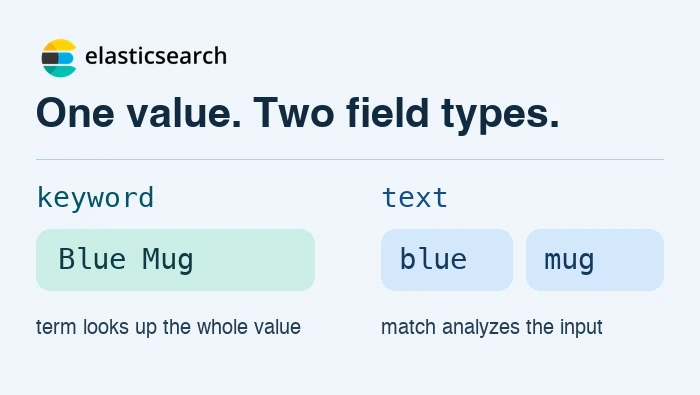
在 Kibana 的 Dev Tools → Console 中,按顺序执行以下请求。首次执行时使用尚未创建的索引名。name 用标准分析器,name.exact 保留完整值,sku 在索引和查询时统一转小写。写入请求等待刷新,后续查询可直接看到这三条数据。
PUT /product_match_term_demo
{
  "mappings": {
    "properties": {
      "name": {
        "type": "text",
        "analyzer": "standard",
        "fields": {
          "exact": {
            "type": "keyword"
          }
        }
      },
      "sku": {
        "type": "keyword",
        "normalizer": "lowercase"
      }
    }
  }
}

PUT /product_match_term_demo/_doc/1?refresh=wait_for
{
  "name": "Blue Mug",
  "sku": "MUG-01"
}

PUT /product_match_term_demo/_doc/2?refresh=wait_for
{
  "name": "Blue Mug Large",
  "sku": "MUG-02"
}

PUT /product_match_term_demo/_doc/3?refresh=wait_for
{
  "name": "Blue Plate",
  "sku": "PLATE-01"
}查找商品名 Blue Mug,把条件写在 name.exact 上。下面也用同一个值执行一次 match 做对照。
GET /product_match_term_demo/_search?filter_path=hits.hits._id
{
  "query": {
    "term": {
      "name.exact": "Blue Mug"
    }
  }
}

GET /product_match_term_demo/_search?filter_path=hits.hits._id
{
  "query": {
    "match": {
      "name.exact": "Blue Mug"
    }
  }
}
两条请求均命中文档 1。默认设置下,keyword 字段把输入 Blue Mug 作为一个整体,文档 2 中较长的名称没有命中。实际索引中的子字段名以映射为准,可在 Console 运行 GET /product_match_term_demo/_mapping 核对。
对 name 查询同一个字符串,再分别用 term 查完整字符串和小写词项。最后把 match 的运算符改为 and。
GET /product_match_term_demo/_search?filter_path=hits.hits._id
{
  "query": {
    "match": {
      "name": "Blue Mug"
    }
  }
}

GET /product_match_term_demo/_search?filter_path=hits.hits._id
{
  "query": {
    "term": {
      "name": "Blue Mug"
    }
  }
}

GET /product_match_term_demo/_search?filter_path=hits.hits._id
{
  "query": {
    "term": {
      "name": "mug"
    }
  }
}

GET /product_match_term_demo/_search?filter_path=hits.hits._id
{
  "query": {
    "match": {
      "name": {
        "query": "Blue Mug",
        "operator": "and"
      }
    }
  }
}
按所列顺序,四个结果分别命中文档 1、2、3,空集合,文档 1、2,以及文档 1、2。标准分析器把 Blue Mug 拆为 blue 和 mug。默认 or 使文档 3 也能凭 blue 命中。and 要求两词均出现,文档 2 仍满足条件。完整字符串的 term 查询找不到对应的单个索引词项。
用小写 mug-01 查询 sku,再用小写 blue mug 查询没有配置归一化的 name.exact。
GET /product_match_term_demo/_search?filter_path=hits.hits._id
{
  "query": {
    "term": {
      "sku": "mug-01"
    }
  }
}

GET /product_match_term_demo/_search?filter_path=hits.hits._id
{
  "query": {
    "match": {
      "sku": "mug-01"
    }
  }
}

GET /product_match_term_demo/_search?filter_path=hits.hits._id
{
  "query": {
    "term": {
      "name.exact": "blue mug"
    }
  }
}
前两条均命中文档 1。lowercase 在索引时把 MUG-01 转为 mug-01,查询输入也走同一规则。最后一条命中为空,说明未配置归一化的 keyword 子字段区分大小写。
搜索名称中有 blue 的商品,同时限制商品编号为 MUG-02。
GET /product_match_term_demo/_search?filter_path=hits.hits._id
{
  "query": {
    "bool": {
      "must": [
        {
          "match": {
            "name": "blue"
          }
        }
      ],
      "filter": [
        {
          "term": {
            "sku": "MUG-02"
          }
        }
      ]
    }
  }
}
结果只含文档 2。must 中的名称查询参与打分,filter 中的编号条件只负责筛选。请求参数 filter_path 仅裁剪返回内容。查无结果时,裁剪后的响应可能是空对象,去掉该参数即可查看完整的命中统计。
keyword 上的 term。text 做全文检索,同时定义 keyword 子字段做等值筛选。keyword 的 normalizer,用归一化后的值理解命中结果。